
MOOER Red Truck Multi-Effects Pedal
$ 78.12
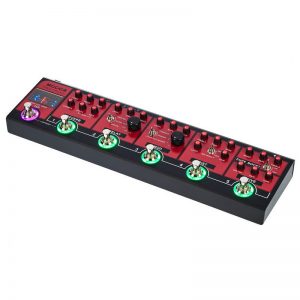
Pedal Layout TAP: Press several times for tap tempo. Hold for Tuner Footswitch 1: REVERB on/off in LIVE mode. Preset 1 in PRESET mode Footswitch 2: DELAY on/off in LIVE mode. Preset 2 in PRESET mode Footswitch 3: MOD on/off in LIVE mode. Preset 3 in PRESET mode Footswitch 4: DIST on/off in LIVE mode. Preset 4 in PRESET mode Footswitch 5: DRIVE on/off in LIVE mode. Preset 5 in PRESET mode DISPLAY SCREEN: Displays the current operation mode of red truck. Displays the tuner when activated Operation Modes Redtruck has two different operation modes. LIVE MODE and PRESET MODE To change operation mode, simultaneously press and release TAP Footswitch 1 1.Live Mode In this mode Redtruck operates like a traditional pedalboard. Each footswitch will switch it’s respective effects module on and off. 2.Preset Mode In this mode Redtruck operates like a pedalboard loop switcher. Each footswitch will recall a preset combination of which effect modules are on/off. The DISPLAY SCREEN will display when in Preset Mode *Ensure Redtruck is in LIVE MODE *Activate the effect modules you want to use in your preset *Press and hold the corresponding footswitch where you wish to save the preset for use in Preset mode *The Footswitch light will flash 5 times to confirm that the preset has been saved to this footswitch *After you have saved your presets, put the Redtruck into PRESET MODE and press any footswitch from 1-5 to recall it’s preset. Note: Effect parameters can not be stored to the presets. Only the on/off state of each effect module will be stored. Effect Modules Red truck has 6 stomp box style effect modules and a built in precision tuner. 1.PURE BOOST: Based on one of MOOER’s most popular and useful micro pedals. The Pure boost is an analog circuit which can provide up to 20 Db of clean boost with a natural and dynamic response to the touch. ON/OFF: Switches the boost effect on and off BOOST: Adjusts the over all amount of boost BASS: Adjusts the low frequencies ±15db TREBLE: Adjusts the high frequencies ±15db 2.DRIVE: Based on the MOOER RUMBLE DRIVE, the DRIVE module of Red truck is a warm and natural analog overdrive circuit. At higher gain it can emulate a vintage amplifier being pushed into breakup. At lower gain settings settings it is perfect for pushing the DIST module for solos or as a warm boost for the guitar. VOLUME: Adjusts the output level GAIN: Adjusts the amount of overdrive TONE: Adjusts the EQ. Clockwise is brighter, Counter clockwise is darker 3.DIST:A classic British style amplifier distortion with full tone stack, independent gain and level controls. The gain ranges from a slight crunchy breakup to a full and harmonically rich high gain saturation. TREBLE: Adjusts the high frequencies MID: Adjusts the middle frequencies BASS: Adjusts the low frequencies LEVEL: Adjusts the overall output level MID-BOOST: Boosts and scoops the middle frequencies GAIN: Adjusts the amount of distortion 4.MOD:A digital multi-modulation unit which brings together tremolo, phaser, chorus and flanger. LEVEL: Adjusts the modulation effect mix RATE: Adjusts the modulation effects speed DEPTH: Adjusts the modulation intensity Toggle Switch: Selects the modulation effect type Rythm Knob: Adjusts the speed of the modulation effect in relation to the tap tempo. (X = random 7s pattern) 5.DELAY:A digital delay unit with 3 different kinds of delay. DIGITAL resembles the crystal clear delay racks of the 80’s. ECHO resembles the magnetic drum delays of the 60’s. ANALOG resembles a classic BB style delay stomp box. LEVEL: Adjusts the volume of the delays repeats TIME: Adjusts the delay time FEEDBACK: Adjusts the number of repeats Toggle Switch: Selects the delay type Sub-division Knob: Adjusts the delay time in relation to the tap tempo 6.REVERB:A true stereo digital reverb unit LEVEL: Adjusts the wet/dry mix of the reverb DECAY: Adjusts the length of the reverb TONE: Adjusts the EQ of the reverb SHIMMER: Adds a high pitched shimmering harmony to the reverb. MOD DEPTH: Rotate clockwise to add modulation to your reverb and adjust the reverb modulation’s depth. When this control is fully counter-clockwise the reverb will not have any modulation MOD RATE: Adjusts the speed of reverb modulation effect 7.TUNER: Red Truck has an accurate built-in guitar tuner. Hold down the TAP foot switch to mute your output and activate the tuner. Press the TAP foot switch once to exit the tuner and un-mute your output. Tap Tempo TAP: Press and release this foot switch several times to create a Tap Tempo. Tap tempo can control both the delay time and modulation rate simultaneously or either of these two effect modules independently. The light surrounding the TAP foot switch will illuminate a different color to indicate what it is controlling. You can change the tap tempo function by pressing a combination of two foot switches simultaneously. See below. DELAY MOD = Purple (press foot switches 3 4) DELAY only =Red (press foot switches 1 2) MOD only = Blue (press foot switches 2 3) By default the tap tempo will control both the delay time and the modulation rate simultaneously. The TAP foot switch light will illuminate purple to indicate this.